



Contents: Golf cars ↓ Setting ↓
Golf cars
No special tools required.
The tire pressure indicator setting should only be checked if it has been changed.
Warning! If the system issues a pressure drop warning due to tire heating, but the tire pressure is actually normal, this erroneous warning can be cleared and the system adjusted. The tire pressure monitoring system uses wheel speed data from the ABS sensors and determines the wheel circumference. A change in wheel circumference is considered by the system as a pressure drop. A change in wheel circumference can be caused by the following reasons:
- pressure reduction;
- damage to the tire frame;
- one-way loading of the vehicle;
- load on one of the vehicle axles, for example, when operating the vehicle with a trailer or when driving uphill or downhill;
- when installing anti-skid chains on wheels;
- when replacing only one wheel.
A change in tire pressure is indicated by a yellow light on the instrument panel (see arrow in illustration 25.0i).
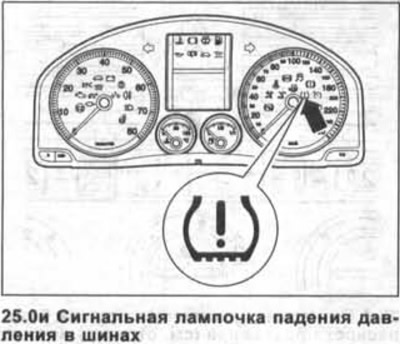
Flashing of the indicator light means that the control system has not been adjusted (initial setup was not performed).
If the light comes on and an acoustic signal is heard, this means that the system has detected a drop in tire pressure.
In this case, you should check the tire pressure and adjust the system.
Setting
27. Turn on the ignition.
28. Simultaneously press the ESP 1 button and the SET 2 button located on the center console and hold them in this position for at least one second (see illustration).
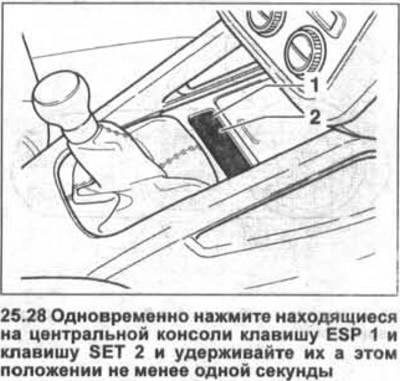
Attention! If there is no ESP key, press the ASR key.
The original text is available on the website: www.VWMANUAL.ru
The indicator light on the instrument panel will remain on as long as the keys remain pressed.
The start of the setup is accompanied by a warning signal.
29. Turn off the ignition. This completes the setup.
Visitor comments