
English Русский
Български
Беларускі
Український
Српски
Hrvatski
Română
Polski
Slovenský
Magyar
  |  Articles  |  Sitemap  |  Contacts  |    |
Car maintenance Ford Car maintenance Hyundai Car maintenance Chevrolet Car maintenance BMW Car maintenance Audi Car maintenance Opel Car maintenance AvtoVAZ
VWmanual.ru


Main   Passat   Golf   Polo   Touareg   Tiguan   Sharan   Transporter   Others  
Passat B2 (1981-1988) Passat B3 (1988-1993) Passat B4 (1988-1996) Passat B5 (1996-2005) Passat B6 (2005-2010)

Cruise control (VW Passat B5)

  • Main
  • Passat
  • Passat B5
  • General information
  • User manual
  • Cruise control
            0


Contents: Turning on ↓ Changing the set speed of movement ↓ Temporary cruise control disabling ↓ Turning off cruise control ↓
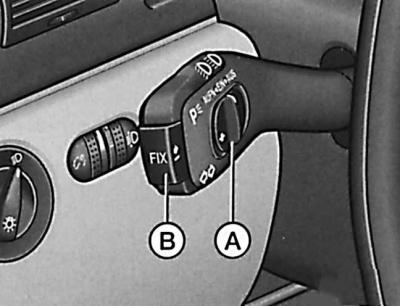
Cruise control


To relieve the driver from the need to maintain the desired speed with the accelerator pedal, cruise control is used, which ensures a constant set speed above approximately 30 km/h, if only the engine can provide it.

Warning: Cruise control should not be used in heavy traffic or adverse road conditions (icy road, poor grip on wet road, gravel surface).


The cruise control is controlled by the sliding switch A and the push button B, located on the steering column stalk for the direction indicators and headlights.

Turning on


The cruise control is activated by moving switch A to the "EIN" position.

Installation (entering into memory) desired speed of movement

When the desired driving speed has been reached, it is sufficient to briefly press the B (FIX) button. Now you can take your foot off the accelerator pedal. The driving speed can be increased in the usual way using the accelerator pedal. After releasing the pedal, the cruise control reduces the driving speed to the previously set value. However, this does not apply if the set speed has been exceeded by more than 10 km/h for more than 5 minutes. In this case, the desired driving speed must be set again.


Warning: The previously set driving speed should only be returned to when this speed is not too high for the immediately upcoming driving conditions.


Changing the set speed of movement


Decrease the set speed

The set speed can be reduced by pressing the B key.

Each time you lightly press the B key, the speed decreases stepwise. If you keep the B key pressed, the speed decreases automatically by moving the accelerator rod. When you release the key, the speed reached is entered into memory.

If you release the key at a speed below 30 km/h, the storage is cleared. Now you must set the desired speed again with key B after accelerating the car to a speed above 30 km/h.

Increase the set speed

The set speed can be increased without pressing the accelerator pedal by moving switch A to the AUFN position.

Each time the sliding switch is lightly pressed to the left, the speed increases stepwise. If the switch is moved to the left and held in this position, the speed increases automatically by moving the accelerator rod. When the switch is released, the achieved speed is stored in memory.

Temporary cruise control disabling


Cars with manual transmission

The cruise control can be temporarily deactivated by pressing the brake or clutch pedal or by moving switch A to the AUS position (without fixing it).

The value of the set speed entered into the memory at this point is saved.

To return to the previously set speed, after releasing the clutch or brake pedal, move switch A all the way to the left.

Warning: You should only return to the previously set driving speed when this speed is not too high for the immediately upcoming driving conditions.


Cars with automatic transmission

Cruise control can be temporarily deactivated by pressing the brake or clutch pedals or by moving switch A to the AUS position (without fixing it).

The value of the set speed entered into the memory at this point is saved.

To return to the previously set speed, after releasing the clutch or brake pedal, move switch A all the way to the left.

Warning: You should only return to the previously selected speed when this speed is not too high for the immediately upcoming driving conditions.


In addition, cruise control is temporarily deactivated when the selector is moved to position N or 1 (4-speed gearbox), and also in position 2 (5-speed gearbox).

The value of the set speed entered into the memory at this point is erased from the memory.

Remembering the selected speed

If, however, there was no speed in the memory during a short-term shutdown, or the set speed was erased, you can set a new desired speed as follows: slide switch A all the way to the left and hold it in this position until the desired speed is reached, or quickly press key B. The speed at the moment the key is pressed will be entered into the memory.

Turning off cruise control


Cars with manual transmission

The cruise control is finally switched off by moving switch A all the way to the right (fixation in position AUS) or – if the vehicle is stationary – by turning off the ignition.

Cars with automatic transmission

The cruise control is finally switched off by moving the selector:
  • in position P, N or R;
  • in position 1 (4-speed gearbox);
  • in position 2 (5-speed gearbox) or
  • on a parked vehicle by turning off the ignition.

This article is available at russian, bulgarian, belarusian, ukrainian, serbian, croatian, romanian, polish, slovak, hungarian
The text has been checked: Tarasov Ivan

Share information:

Previous articles
Steering column switch for direction indicators and headlights
Switches and switches
Navigation system
Minor violations (yellow pictograms)
Violations of primary importance (red pictograms)
Automatic control system with multifunctional indicator
Next articles
Windscreen wipers and washers
Heating and ventilation
Heating and ventilation air supply nozzles
Air conditioning system
Air conditioning air supply nozzles
Climate control system «Climatronic»


Similar articles from other manuals for VW cars:
Turning on cruise control Golf 4 (1997-2004)
Cruise control system Polo 4 (2001-2009)
Cruise Control (CHA) Touareg 1 (2002-2006)
Cruise control switch, horn switch Tiguan 1 (2007-2015)
Electronic control unit — general information Sharan 1 (1995-2000)
Dynamic oil pressure control Transporter T4 (1990-2003)
Engine management system AGX 2.5 TDI from November 1997 (V).… LT 2D (1996-2003)
Link to this page in different formats


Visitor comments


No comments yet


How much will 37 + 42 =


Passat B6 
  • General information
  • User manual
  • Maintenance
  • Petrol engine 1.6L
  • Engine repair
  • Cooling and lubrication system
  • Fuel injection system
  • Petrol engine 2.0L
  • Engine repair
  • Lubrication system
  • Cooling system
  • Fuel and exhaust systems
  • Diesel engine 2.0L
  • Engine repair
  • Cooling and lubrication system
  • Fuel and exhaust systems
  • Transmission
  • Clutch
  • Mechanical gearbox
  • Automatic gearbox
  • Drive shafts
  • Chassis
  • Wheels and tires
  • Car suspension
  • Steering
  • Brake system
  • Body
  • Exterior (external elements)
  • Electrical equipment
  • Power devices
  • Lighting and appliances
  • Electrical circuits
Passat B5 
  • General information
  • User manual
  • Weekly checks
  • Maintenance
  • Power unit
  • Engine repair
  • Cooling system
  • Fuel system (petrol)
  • Fuel system (diesel)
  • Engine management
  • Exhaust system
  • Transmission
  • Clutch
  • Car gearbox
  • Drive shafts
  • Chassis
  • Car suspension
  • Wheels and tires
  • Steering
  • Brake system
  • Body
  • Exterior (external elements)
  • Interior (internal elements)
  • Doors and covers
  • Ventilation and heating
  • Electrical equipment
  • Power devices
  • Lighting and appliances
  • Electrical circuits
Passat B4 
  • General information
  • User manual
  • Maintenance
  • Technical data
  • 8-valve engine
  • Engine repair
  • Cooling and lubrication system
  • Supply system
  • Ignition system
  • Fuel injection «Mono-Jetronic»
  • Control system «Mono-Motronic»
  • Control system «Digifant»
  • Control system «Simos»
  • 16-valve engine
  • Engine repair
  • Cooling and lubrication system
  • Fuel injection «K-Jetronic»
  • Control system «KE-Motronic»
  • Control system «Digifant»
  • Diesel engine
  • Engine repair
  • Cooling and lubrication system
  • Power and control system
  • Turbocharging system
  • Digital control system
  • Transmission
  • Clutch
  • Manual gearbox
  • Hydromechanical gearbox
  • Front wheel drive
  • Chassis
  • Car suspension
  • Steering
  • Brake system
  • Body
  • Body elements
  • Electrical equipment
  • Power devices
  • Lighting and appliances
  • Electrical circuits
Passat B3 
  • General information
  • User manual
  • Driving Tips
  • Maintenance instructions
  • Technical data
  • Power unit
  • Engine repair
  • Ignition system
  • Lubrication system
  • Cooling system
  • Supply system
  • Petrol injection system
  • Diesel engine
  • Exhaust system
  • Transmission
  • Clutch
  • Car gearbox
  • Chassis
  • Suspension
  • Steering
  • Brake system
  • Wheels and tires
  • Body
  • Exterior
  • Interior
  • Heating system
  • Electrical equipment
  • Power devices
  • Lighting system
  • Equipment and devices
  • Wiper system
  • Electrical circuits
Passat B2 
  • General information
  • Introduction to instructions
  • User manual
  • Power unit
  • Engines 4-cylinder FZ
  • Engines 4-cylinder
  • Engines 5-cylinder
  • Transmission
  • Clutch
  • Four-speed gearbox
  • Five-speed gearbox
  • Hydromechanical gearbox
  • Front wheel drive
  • Chassis
  • Front suspension
  • Rear suspension
  • Steering
  • Brake system
  • Body
  • Body elements
  • Electrical equipment
  • Equipment and devices
  • Electrical circuits
VWmanual.ru © 2016-2026 | Mobile version | News and articles | Sitemap: EN BG BY UA RS HR RO PL SK HU | Write message | Site search
Passat B2 • Passat B3 • Passat B4 • Passat B5 • Passat B6 • Golf 1, diesel • Golf 1, petrol • Golf 2, petrol • Golf 2 • Golf 3 • Golf 4 • Golf 5 • Polo 3 • Polo 4 • Touareg 1 • Tiguan 1 • Sharan 1 • Transporter T3 • Transporter T4 • LT 28 • LT 2D • Beetle • Caddy 3 •
Our website uses cookies to ensure functionality and convenience.