



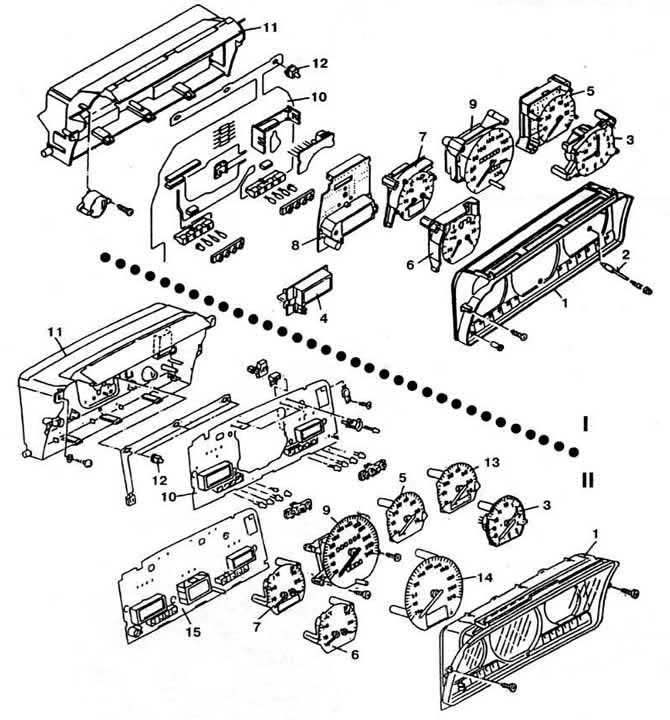
Fig. 8-18. Instrument cluster details:
I — cars up to model year 1989;
II - cars from the 1990 model year.
1 - visor;
2 - time setting button;
3 - hands watch;
4 - digital clock (on some cars);
5 - tachometer;
6 - fuel level and coolant temperature indicators;
7 - fuel level and coolant temperature indicators on vehicles with a tachometer;
8 — trip computer monitor;
9 - speedometer with trip meters;
10 - printed circuit board;
11 — instrument panel housing;
12 — backlight lamp;
13 - tachometer for cars with automatic transmission;
14 — speedometer for cars with a trip computer;
15 - computer mounting board.
To remove, disconnect the wire from the negative terminal of the storage battery. Shine the horn button trim. Unscrew the steering wheel mounting nut and remove the steering wheel. Remove the instrument cluster visor by unscrewing the two mounting screws (Fig. 8-22). Unscrew the two instrument cluster mounting screws. Pull forward the right side of the instrument cluster and disconnect from it the electrical connectors, the flexible speedometer drive shaft (Fig. 8-19) and, depending on the configuration, the fuel flow sensor vacuum tube. Remove the instrument cluster.
The article is published on this resource (VWMANUAL)
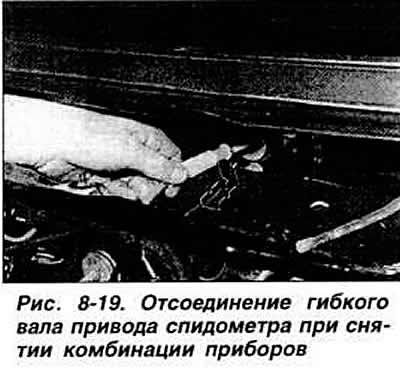
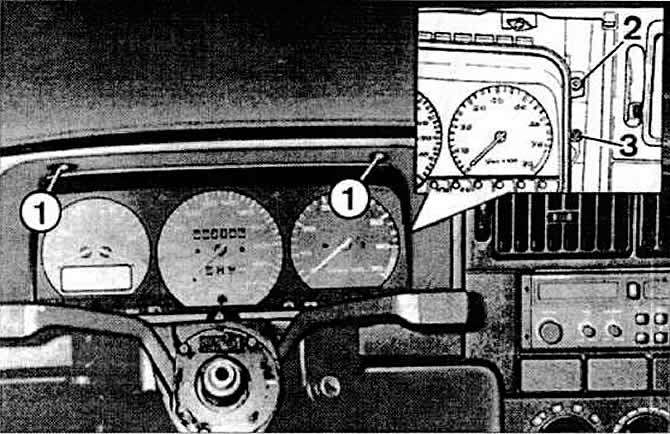
Fig. 8-22. Removing the instrument cluster:
1 - visor mounting screws;
2 - instrument cluster mounting screws;
3 - glass fastening screws.
To install, disconnect the flexible speedometer drive shaft from the mount on the front shield of the body, pull the shaft into the passenger compartment and connect it to the socket in the instrument cluster. Install the instrument cluster in the reverse order of removal. After installation, make sure that all instruments and indicator lights are working properly, then test drive to check the correct position of the steering wheel and the operation of the speedometer.
Visitor comments