



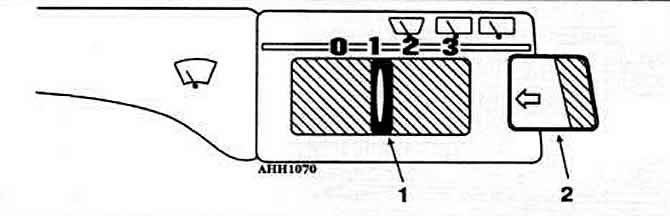
Fig. 8-17. Trip computer control switch:
1 — switch for selecting the type of information and resetting readings;
2 — key for sequential output of information to the monitor.
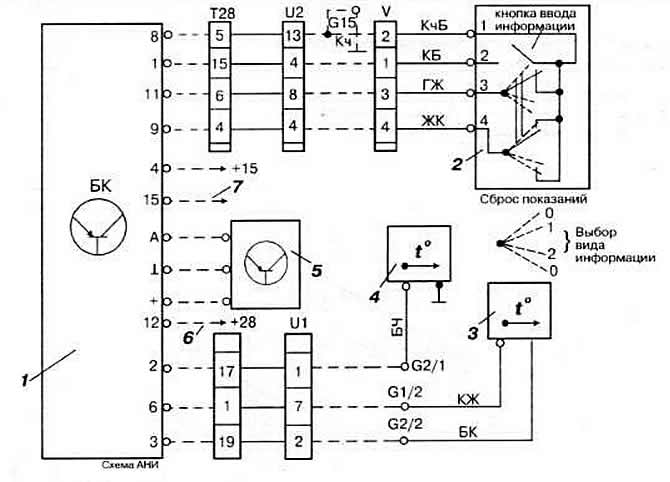
Fig. 8-20. On-board computer connection diagram:
1 - on-board computer;
2 - computer switch block;
3 - outside air temperature sensor;
4 - oil temperature sensor;
5 - air flow sensor;
6 - to the speed sensor;
7 - to the tachometer.
For wire color designations, see Fig. 8-8.
The computer has two storage devices into which the following information is entered.
1. In the current information memory used when the slider switch is in position "1":
- duration of the trip in hours and minutes, not counting the time of stops;
- average fuel consumption in l/100 km;
- distance traveled in km;
- average speed in km/h.
Note: If the vehicle is stopped for more than 2 hours, this information is automatically erased.
2. The summing memory used when the slider switch is in position "2" outputs the listed types of information, as well as their total values, stored until the following limit values are reached:
- driving time: 100 h;
- distance traveled 10,000 km;
- fuel consumption: 1000 l
Regardless of both memory devices, the following current information is issued:
- engine oil temperature within 50-160°C;
- outside air temperature within the range from -40 to +50°C.
(View the original on the website: VWmanual.ru)
Note: Fuel flow sensor, which senses the vacuum in the engine intake manifold, and the vehicle speed sensor (hall sensor) are located behind the instrument cluster. The location of the computer connectors is shown in Fig. 8-21.
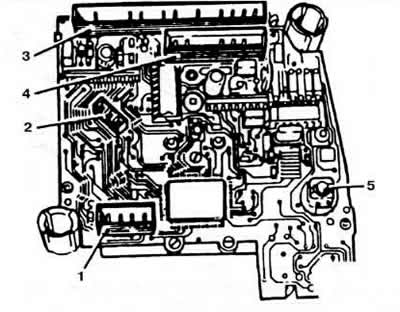
Fig. 8-21. Location of on-board computer connectors:
1 - 4-pin electronic clock connector;
2 - 3-pin fuel flow sensor connector;
3 - 8-pin connector for fuel level and temperature indicators;
4 - 5-pin connector;
5 — backlight lamp.
Visitor comments