



Contents: Removal ↓ Installation ↓
Location of radio and speakers in the car
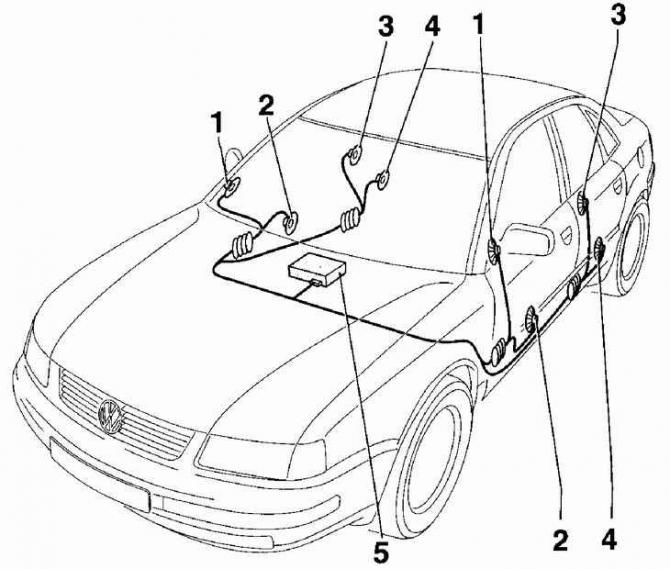
- 1 - high-frequency speakers on the front doors,
- 2 - low-frequency speakers on the front doors,
- 3 - high-frequency speakers on the rear doors,
- 4 - low-frequency speakers on the rear doors,
- 5 - radio receiver on the dashboard
The factory installed radio has a pocket that makes it easy to remove and install the radio. Two special keys are required to remove the radio.
Removal
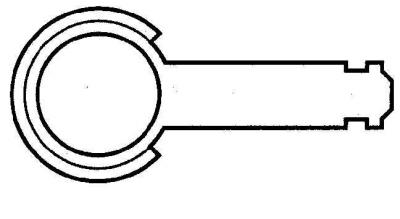
A special key used to remove the radio from a car
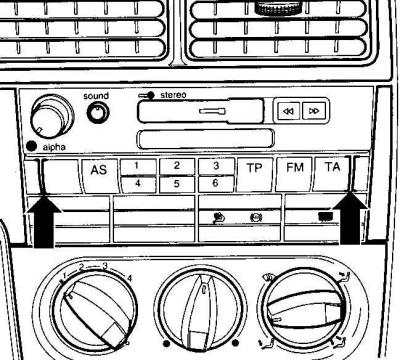
Location of narrow slots for installing special keys when removing the radio
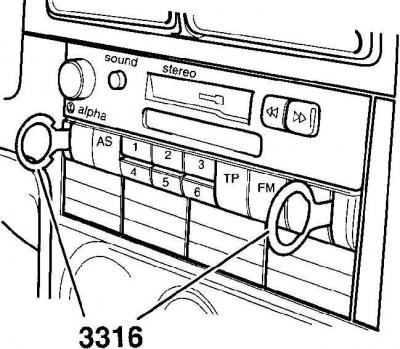
Using special keys to remove the radio from its socket in the instrument panel
1. Turn off the ignition.
2. Remove the ground cable from the battery.
Warning: When the ground wire is removed from the battery, the contents of the memory cells of the electronic control units and the radio receiver are erased.
3. The car is equipped with a radio receiver as standard equipment, which has a coded anti-theft device, which is based on a microprocessor. After disconnecting the radio receiver from the car's electrical network, (battery removal, radio removal or initial radio installation) you must enter a security code. The radio can only be turned on after entering the correct code.
4. Before removing the ground wire from the battery, check whether you have the radio receiver code. If there is no security code, the radio receiver can only be put into operation at a specialized Volkswagen station. The individual radio receiver security code is included in the technical documentation included with the car upon sale.
5. To remove the radio receiver, you need to use two special keys 3316, see Fig. Special key used to remove the radio receiver from the car.
6. Insert two keys into the narrow slots located on both sides of the radio until the keys are locked, see Fig. Location of narrow slots for installing special keys when removing the radio.
7. Use the key heads to remove the radio from the socket (see fig. Using special keys to remove the radio from the socket in the instrument panel). When removing, do not tilt the radio or pull it to the side.
8. Remove the special keys by pressing down the side latches of the radio.
9. Disconnect the speaker and antenna electrical connectors from the radio, as well as the multi-pin connector that supplies power to the radio. If non-multi-pin connectors are used for the connections, label the connectors before disconnecting them.
Installation
1. Connect the electrical connectors to the back of the radio.
2. Insert the radio into the instrument panel socket until the spring clips snap into place.
3. Connect the ground wire to the battery.
4. Once the radio is installed, enter the security code. Radios with a security code have a red key emblem on the front key. The individual security code for the radio is included in the technical documentation supplied with the vehicle when it was sold. Keep a record of the individual code in a safe place and never keep it in the vehicle.
5. Please enter your radio security code as follows.
6. Turn on the radio.
7. Press the TR and TA keys simultaneously until 1000 appears, then release the keys.
8. Enter the security code using station selection keys 1 through 4. Key 1 determines the first code number, key 2 the second code number, etc.
9. Press the TR and TA keys simultaneously again until SAVE appears, then release the keys. The receiver is now operational and the display shows the frequency of the radio station being received. If the security code has been entered correctly into the radio, the LED next to the name of the radio should flash after the key is removed from the ignition.
Warning: If the security code has been entered incorrectly into the radio, the SAVE sign will first flash and then remain lit. After this, you can only repeat the process of entering the security code once. If you enter the security code incorrectly again, the radio will be locked and will not be able to be used for one hour. After one hour, during which the radio must be switched on, enter the security code again.
Visitor comments