



Contents: Removal ↓ Installation ↓
Location of electrical connectors on the rear of the instrument cluster
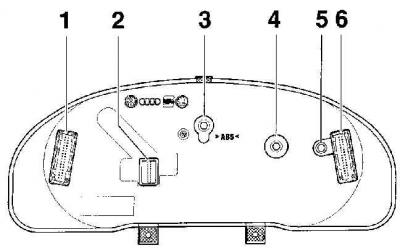
- 1 - 34-pin green electrical connector,
- 2 - 20-pin red electrical connector (installed only on the 3rd version),
- 3 - high beam indicator lamp 1.12 W,
- 4 - exhaust gas indicator lamp 1.12 W,
- 5 - trailer turn signal indicator lamp 1.12 W,
- 6 - 32-pin blue electrical connector
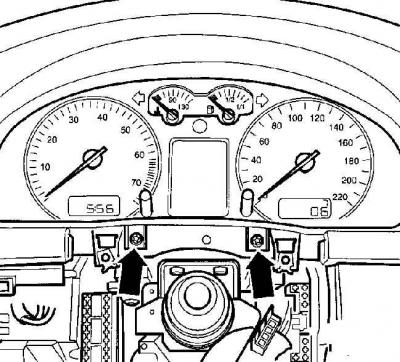
Location of instrument cluster mounting screws
Removal
Removal the lower side trim on the driver's side
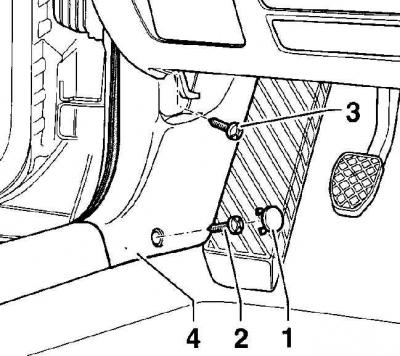
- 1 - plug,
- 2 - screw,
- 3 - screw,
- 4 - side trim
Removal the lower instrument panel trim panel on the driver's side
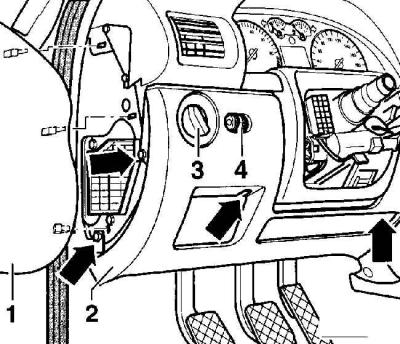
- 1 - side cover,
- 2 - lower trim panel,
- 3 - light switch,
- 4 - headlight corrector
The arrows indicate the location of the screws that secure the lower trim panel.
(The original text can be found at: VWManual)
Removal the decorative trim under the instrument cluster
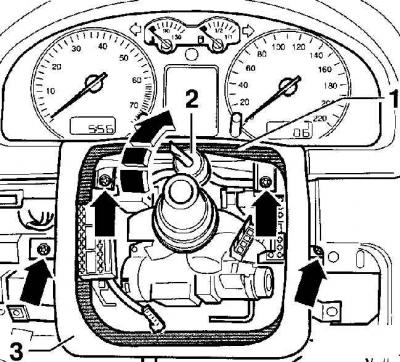
- 1 - inner side of the lining,
- 2 - clamp,
- 3 - decorative cladding
Warning: Only the indicator bulbs may be replaced in the instrument cluster. If one of the indicators fails or if there is any other defect, the instrument cluster must be replaced as a whole.
1. Remove the steering column switches.
2. Remove the driver's side lower side trim by removing the plugs covering the mounting screws and unscrewing the screws, see Fig. Removing the driver's side lower side trim. Move forward and remove the driver's side lower side trim.
3. Remove the lower instrument panel trim on the driver's side. Remove the side decorative trim from the left end of the instrument panel.
4. Remove the screws (arrows) securing the driver's side lower instrument panel trim panel, see Fig. Removing the driver's side lower instrument panel trim panel.
5. Disconnect the electrical connectors from the headlight switch and headlight range control.
6. Lift the decorative trim (1) from the inside and, using a rigid clamp (2), fix it in this position, see Fig. Removing the decorative trim under the instrument cluster.
7. Unscrew 4 screws and remove the decorative trim, see Fig. Removing the decorative trim under the instrument cluster.
8. At the bottom of the instrument cluster, unscrew the two screws and remove the instrument cluster, see Fig. Location of instrument cluster mounting screws.
9. Disconnect the electrical connectors from the rear of the instrument cluster, see Fig. Location of electrical connectors on the rear of the instrument cluster.
10. Replace the bulbs if necessary.
Installation
1. Installation is carried out in the reverse order of removal.
2. If a new instrument cluster is installed, adjust the readings of the Service indicator and the odometer.
Visitor comments