



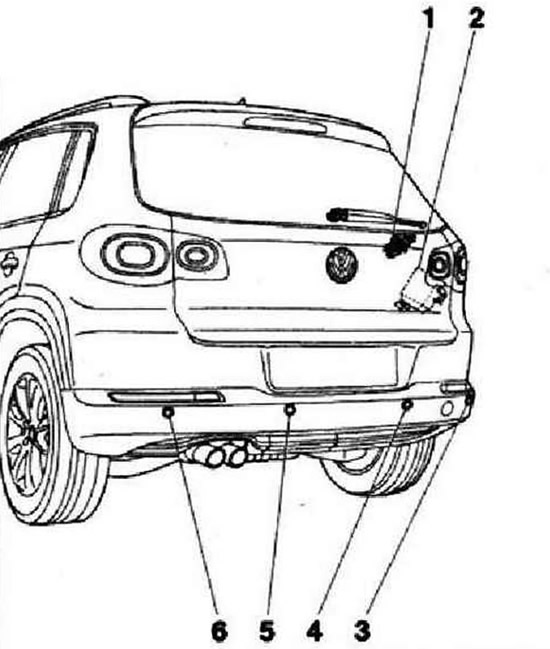
- 1 - Rear warning buzzer "H15", behind the right side trim panel of the trunk
- 2 - Rear parking aid control unit, in vehicles without front PDC or rear PLA: behind the right-hand side wall trim near the tail light, in vehicles with front PDC or PLA: in the footwell, behind the left-hand dash panel relay box. In vehicles with parking aid only in the rear bumper trim, the parking aid functions are controlled by the parking aid control unit "J446". In vehicles additionally equipped with front parking aid (PPA) or transverse parking aid (PLA), the parking aid functions are controlled by the transverse parking aid control unit "J791"
- 3 - Rear right parking assistant sensor "G206", in the rear bumper trim
- 4 - Rear parking assistant sensor, center right "G335", in the rear bumper trim
- 5 - Rear parking assistant sensor, center left "G334", in the rear bumper trim
- 6 - Rear left parking assistant sensor "G203", in the rear bumper trim
Instructions: If there are any faults, you need to know how the parking assistant works and how to operate it. Rear parking assistant system ROS (Park Distance Control) (ZPA) helps the driver when reversing by signaling the distance to an obstacle behind the car using audible tones. The rear parking assistant is switched on automatically when the reversing lights are switched on. A distinction is made between cars with a rear parking assistant and a front parking assistant or a gap assistant. The parking assistant is a component of the gap parking assistant (PLA).
Rear parking assistant control unit
In vehicles with one parking aid only in the rear bumper trim, the parking aid functions are controlled by the parking aid control unit "J446". The parking aid control unit "J446" is located behind the right-hand side wall trim next to the reversing light. In vehicles that are additionally equipped with front parking aid (PPA) or wide-open parking aid (PLA), the parking aid functions are controlled by the wide-open parking aid control unit "J791". The wide-open parking aid control unit "J791" is located behind the instrument cluster.
Removal and installation the rear parking assistant control unit "J446"
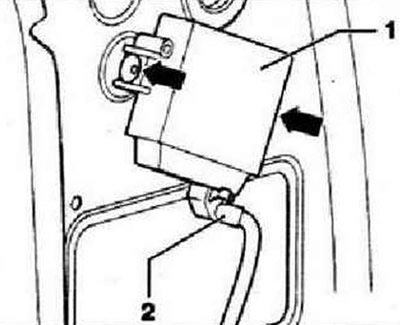
Switch off the ignition and all electrical consumers, remove the ignition key. Remove the right side trim of the trunk. Unlock and disconnect the plug connector "2". Disconnect both rivets with the notch "arrow" and remove the parking assistant control unit "J446" "1".
The original text can be found on the portal (VWManual.ru)
Installation is carried out in reverse order.
Removal and installation rear parking sensors
The rear bumper cover contains the following four sensors.
- Rear left parking aid sensor "G203"
- Parking assistant sensor rear center left "G334"
- Parking assistant sensor rear center right "G335"
- Parking assistant sensor rear right "G206"
Instructions: Removal and installation of the rear parking assistant sensors is performed similarly for all, so the description is given only for one sensor.
Turn off the ignition and all electrical consumers, remove the ignition key.
Caution: It is essential to follow the order of removing the battens. Otherwise, the sensor may be damaged. Applying excessive force to the sensor may cause microcracks, which lead to its failure. First remove the sensor from the holder and then disconnect the sensor connector.
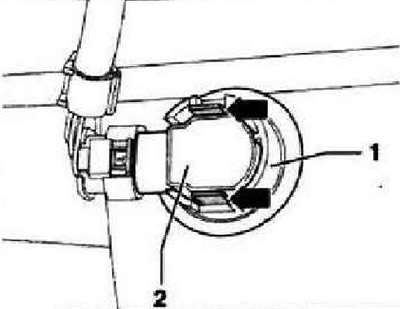
Remove the rear bumper trim. Press the "arrow" latches on the sensor "1" holder outward and remove sensor "2" with the wires connected back from the holder.
Instructions: When removing the sensor, make sure that the separating ring (black silicone ring) remains on the sensor head, not in the holder and is not lost. It is imperative to avoid stretching the disconnecting ring.
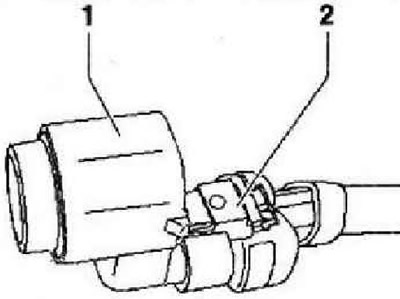
Unlock and disconnect connector "2" and remove sensor "1".
Installation in reverse order.
Caution: If the disconnecting ring is damaged, malfunctions may occur. Avoid stretching the disconnecting ring. Replace the damaged disconnecting ring. When installing the sensor, ensure that the disconnecting ring is correctly positioned on the sensor head and is not twisted or dented when inserted into the sensor holder. The two clamps of the sensor holder must click audibly when the sensor is installed.
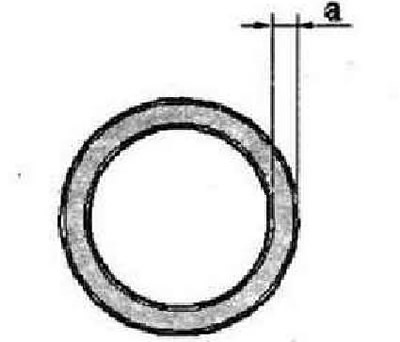
After installing the sensor, check the correctness of the sensor seat in the holder. On the outer side of the bumper, the size "a" of the annular gap between the sensor head and the bumper cover should be visible evenly along the entire perimeter.
Rear warning buzzer "H15"
The rear warning buzzer for the parking assistant "H15" is located behind the right side wall trim.
Removal and installation the rear warning buzzer of the parking assistant "N15"
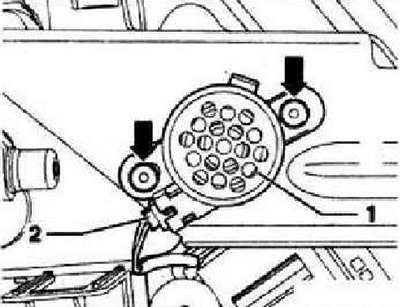
Remove the right side wall trim Unlock and disconnect the plug connector "1". Remove the pull-out rivets "arrows" and remove the rear parking assistant warning buzzer "H15" "1".
Installation is carried out in reverse order.
Visitor comments