



Contents: Removal ↓ Installation ↓
Removal
Remove the steering column.
Remove the instrument cluster.
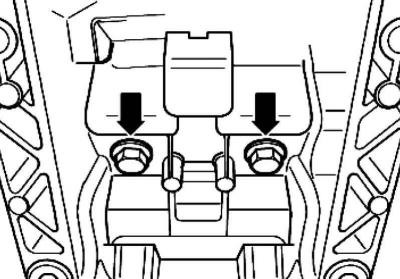
Fig. 5.15. Bolts under the console
Remove the bolts under the console (Fig. 5.15).
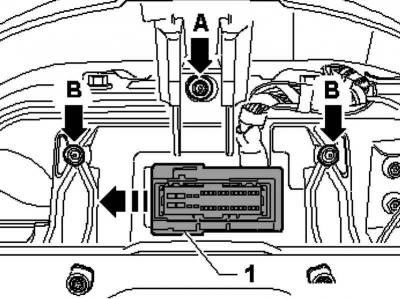
Fig. 5.16. Removing the plug
Slide plug 1 in the direction and remove it from the receptacle in the support bracket (Fig. 5.16).
Unscrew bolt A.
Remove the bolts B securing the console to the body.
Note: Bolts B are screwed in from the cross member side.
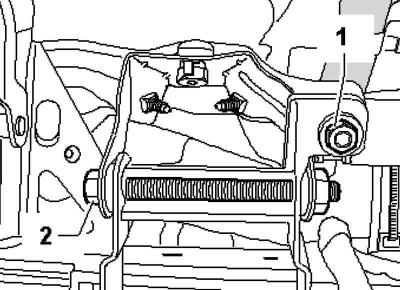
Fig. 5.17. Support bracket mounting bolts
Unscrew bolts 1 and 2 and remove the support bracket from the body (Fig. 5.17).
Installation
Insert the support bracket and screw in bolts 1 and 2.
Tighten bolts B.
Note: Bolts B are screwed in from the cross beam side.
Screw in bolt A.
Insert plug 1 into the receptacle in the support bracket and push it against it until it stops.
Tighten the bolts under the console.
Install the steering column.
Install the instrument cluster.
After this, perform a basic adjustment of the steering angle sensor using a tester.
Visitor comments