



Contents: Execution order ↓ Remembering the adjustment of the…↓ Matching the remote control key with…↓
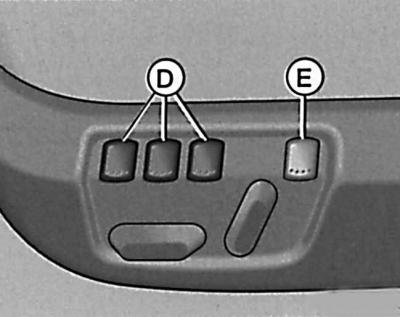
Execution order
1. Turn on the ignition.
2. Adjust the seat position.
3. Set the position of both outside mirrors.
4. Press one of the memory keys D and hold it down for approximately three seconds until a beep sounds to confirm successful completion of the memorization process.
The adjustment data is entered into the memory device under the key you selected.
We recommend that you start filling the memory with the left key and indicate to each other driver his key.
Each new entry of adjustments into the memory device erases the previous adjustments on this key from the memory.
When the battery is disconnected from the vehicle's electrical system, all stored seat and exterior mirror adjustments are erased.
Remembering the adjustment of the outside mirror when reversing
You have the ability to change the previously adjusted position of the right mirror for reversing and enter new adjustments made according to your requirements into the memory device.
1. Switch the outside mirror setting to the right mirror.
2. Engage reverse gear.
3. Install the right mirror.
4. Press the memory button D, which stores the seat and outside mirror settings for forward driving, and hold the button down for approximately three seconds until a beep sounds to confirm successful completion of the memorization process.
This adjustment is now stored in the memory under the selected memory key.
As soon as you engage reverse gear, the right mirror will move to a preset position. This process will be interrupted when you manually start to set this mirror to a new desired position.
As soon as you disengage reverse gear, the right mirror will move back to the stored position when driving forward.
Each time you re-enter the seat and exterior mirror settings for forward travel, you must also re-enter the individual right-hand mirror setting for reverse travel, otherwise the previous setting will remain in effect.
Matching the remote control key with the memory keys
In order for the settings stored in the memory to also be recalled via the radio remote control, you must pair the radio remote control key with each memory key.
We recommend that one of the two radio remote control keys supplied with your new vehicle be matched to the left memory key and the other key to the middle key.
If you wish, you can order another remote control key from your Volkswagen service center and then match it with the right memory key.
The remote control key must be matched in the following order: After the seat and outside mirror adjustments have been memorised, you have 10 seconds to match the key to the corresponding memory key.
1. Remove the remote control key to be matched from the ignition switch.
2. Press and hold the key release button for approximately one second until a beep sounds indicating the pairing process has been successfully completed.
Thus, the required data is entered into the memory device under the selected memory key.
If the remote control key was previously paired with another memory key, all previous pairing data is erased.
If a key is matched with a memory key that was previously matched with another key, all previous matching data is erased.
The key assignment to the memory button remains valid even if new seat and exterior mirror adjustments have been made under this memory button.
When the battery is disconnected from the vehicle's electrical system, all data on matching keys with memory keys is erased.
Visitor comments