



Contents: Removal ↓ Installation ↓
Location of the brake light switch
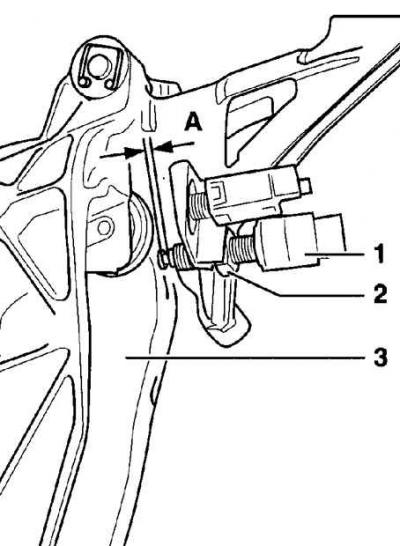
- 1 - brake light switch,
- 2 - lock nut M12x1.5,
- 3 - brake pedal,
- A = 0.1–0.5 mm
Removal
1. Remove the carpet in the driver's footwell.
2. Disconnect the electrical connector from the brake light switch (see Fig. Location of the brake light switch).
3. Loosen the lock nut and unscrew the brake light switch from the brake pedal bracket. Save the snap ring located between the lock nut and the brake pedal bracket.
Installation
1. Screw the brake light switch into the brake pedal bracket until the distance between the switch plunger and the brake pedal is 0.1–0.5 mm. In this position of the switch, tighten the lock nut to 5 Nm. When installing the brake light switch, the brake pedal must be in its original position.
2. Connect the electrical connector to the brake light switch.
3. Check the operation of the brake light switch. Even with a slight press on the brake pedal, the brake lights should light up.
4. Replace the carpet in the driver's footwell.
Visitor comments