



Contents: Removal ↓ Installation ↓
Removal
Turn off the ignition and all electrical consumers and turn the key to position 0 (preliminary stop).
Turn the light switch handle to the "0" position.
Press the rotating handle inward 1 and turn it slightly to the right 2.
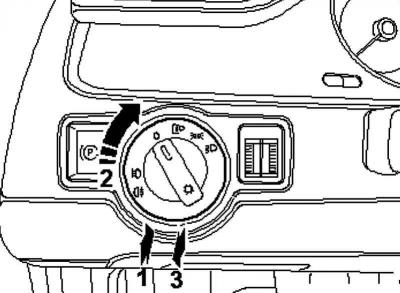
Fig. 7.95. Removing the light switch
Hold the handle in this position and remove the light switch on the handle from the front panel 3 (Fig. 7.95).
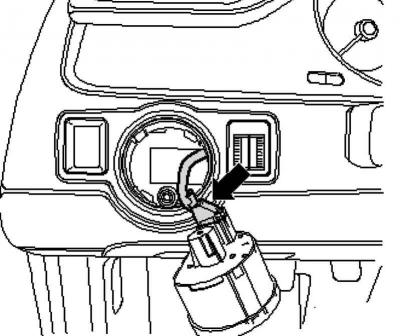
Fig. 7.96. Light switch plug connection
Unlock the plug connection and disconnect the plug from the light switch (Fig. 7.96).
Installation
Insert the plug into the light switch.
Note: Due to the simplicity of the operations, the plug is not shown in the figure.
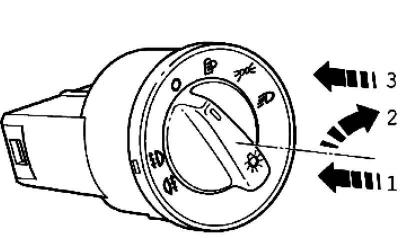
Fig. 7.97. Installing the rotating handle
Hold the light switch firmly and insert the rotating handle inside 1, while turning the handle to the right 2 (Fig. 7.97).
Keep the handle in this position and install the light switch in this position into the front panel 3.
Turn the handle to the "0" position, release and snap the switch into place.
Visitor comments