



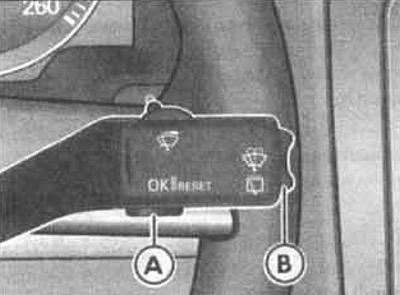
Using the steering column switch, you can display various readings on the display via the main menu.
Calling the main menu
- 1. Turn on the ignition. The car icon appears on the display.
- 2. Press button A on the steering column stalk once.
To return to the main menu from any menu, hold down the B key for two seconds.
(The original text is available on the website: VWManual)
Selecting a menu from the main menu
- 3. Press the B key at the top or bottom to mark the menu item. To call the marked menu item, press the A key.
They appear only when the main menu is called up or when there is a need to display warning or service messages.
After turning on the ignition, the main menu appears for five seconds, then the display disappears again.
| Main menu | Function |
| MFA | Switching to the on-board computer. |
| Audio | When the radio is on, the name of the received radio station is displayed |
| Navigation | This menu item is only available on vehicles with a navigation system. The navigation system must be turned on |
| Telefon | This menu item is only available on vehicles with a built-in phone |
| Standheizung | This menu item is only available on vehicles with independent heating |
| Fzg-Status | Necessary warning or information messages appear here. This menu item flashes when such messages are present. |
| Einstellungen | Setting the current time, speed limit when driving with winter tires, units of measurement, language, independent heater, lighting, comfort |
| Anzeige aus | The readings are off |
Visitor comments