



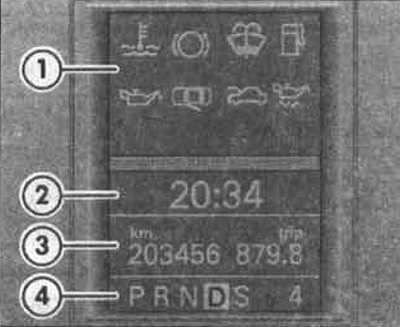
1 - signal lights
2 - clock. Some models have an outside air temperature indicator to the right of the clock
3 - mileage counters or indication of maintenance dates
4 - indication of the position of the automatic transmission control lever. Information and setup menus are displayed here
Display
In addition to text messages and warning lights, the instrument panel display shows the current time, total and daily mileage, as well as the position of the automatic transmission control lever.
Odometers or service interval indicators
The left side of the display shows the total mileage of the car, the right side shows the mileage per day. The last digit of the daily counter shows 100-meter segments. The daily counter can be set to zero by pressing the [o.o] key.
Service indicator
When the service deadline approaches, a reminder appears on the display.
A "wrench" icon appears and the "km" display indicates the remaining mileage until the next maintenance.
This reading is displayed for approximately ten seconds, and then a "clock icon" appears along with the number of days until the next service.
The following message is shown on the instrument cluster display: "SERVICE IN...KM ODER...TAGEN" (SERVICE IN... KM OR... DAYS).
(View the original article on the resource vwmanual)
This reminder disappears approximately twenty seconds after the ignition is switched on or when the engine is running. You can switch to the normal readings by pressing the reset button for the daily counter or by using the right steering column switch.
When maintenance is required, an acoustic signal is given and a flashing "wrench" icon appears for approximately twenty seconds.
The display shows the message: "SERVICE JETZT" (MAINTENANCE NOW).
When the maintenance period has passed, the display shows the mileage or days with a minus sign.
Visitor comments