



Contents: Checking the slave disk status ↓ Checking the degree of wear of the…↓ Checking the deformation of the…↓ Checking the clutch release bearing ↓
After removing the clutch, remove the wear products of the linings from the surface of the casing, discs and flywheel using only a special cleaner or methyl alcohol. Carry out the work in a respirator and protective glasses, as dust is harmful to health.
Wipe the inside of the flywheel with a rag soaked in gasoline and check the friction surface of the flywheel. If the friction linings of the driven disk are worn down to the rivet heads, it is quite possible that the rivets have damaged the working surface of the flywheel or the clutch pressure plate.
Check the pressure plate and clutch housing for damage, scratches, cracks, color spots caused by overheating or deformation. If damage is found, replace both parts as a whole.
Checking the slave disk status
Check the condition of the friction linings. If they are oiled, cracked, wear unevenly, have one-sided scuffs, or if the distance between the rivet head and the working surface of the lining has decreased to 0.3 mm, replace the driven disk with a new one.
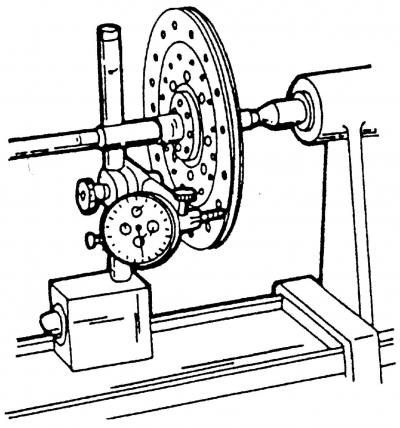
Fig. 227. Checking the runout of the driven disk
Make sure that the damper springs of the driven disk are not damaged and that their wedge engagement is not too badly broken. To check the runout of the driven disk, place it on a suitable mandrel and clamp it between the holders of the lathe (Fig. 227).
Mount the measuring device on the holder so that the measuring finger is located opposite the edge of the driven disk, namely on the outer edge of the disk. Slowly turn the driven disk, watch the readings of the measuring device. If the runout of the working surface of the friction linings is more than 0.4 mm, then, if desired, you can carefully straighten it with pliers, or replace the driven disk.
Check the degree of wear of the friction linings using a depth gauge.
Check the condition of the splines in the driven disk hub and on the gearbox input shaft, as well as the gap in their splined connection. If the gap exceeds 0.4 mm, the splined connection is considered worn. The cause of this is usually the driven disk.
Checking the degree of wear of the diaphragm spring petals
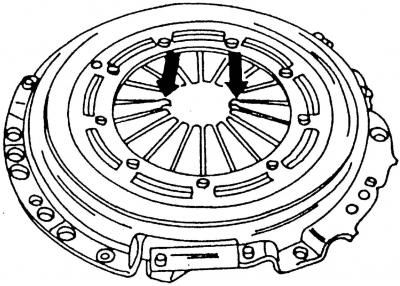
Fig. 228. Checking the wear of the diaphragm spring petals. (The test locations are indicated by arrows)
If there are deep traces of wear on the ends of the petals (Fig. 228), replace the housing together with the pressure plate. Traces of wear on the ends of the diaphragm spring petals to a depth of up to half its thickness are allowed.
Check the position of the diaphragm spring petals. The deviation of the petals from one plane should be no more than 0.5 mm. If the deviation from the plane is greater, the petals can be slightly bent using a special tool or a metal strip with a slit.
Checking the deformation of the working surface of the pressure plate
The surface of the pressure plate is subject to inspection for warping using a metal ruler (bar) and feeler gauge.
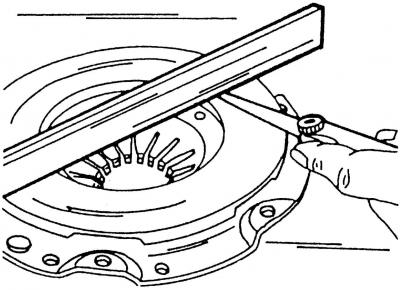
Fig. 229. Checking the deformation of the working surface of the pressure plate
Place a metal ruler on the working surface of the pressure plate (Fig. 229) and use a feeler gauge to measure the gap between the plane of the working surface and the ruler.
A pressure plate with an inward deflection of less than 0.3 mm can be used in further operation.
Checking the clutch release bearing
Check the removed release bearing, paying particular attention to the smoothness of its rotation, play and signs of wear.
Attention! The removed bearing can only be wiped, but not washed.
The bearing should be checked by hand. It should rotate easily and not make noise. Pay special attention to the bearing that was noted to be noisy when the clutch was disengaged (pressing the pedal). Increased noise when disengaging the clutch indicates a faulty release bearing.
Note: It is recommended to replace the release bearing at the same time as the clutch driven disc.
Visitor comments