



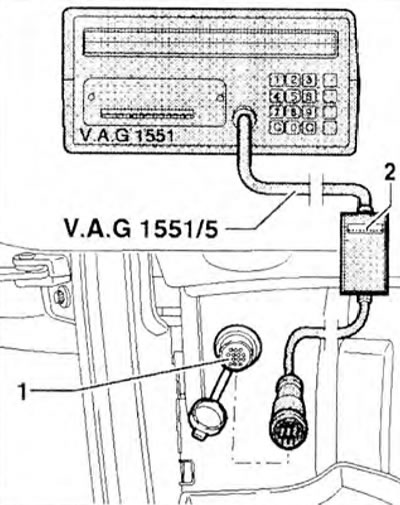
Figure 2.74. Connect the VAG 1551 fault code reader to diagnostic connector 1 with the ignition off.
2. Turn on the ignition. The display should show the following information:
VAG 1551 D/7.0 07/03/97
The display will show the software version.
3. After connecting the reader, depending on the function you require, turn on the ignition or start the engine. The display should show the following information:
Self-diagnosis VAG HELP
- 1 - Gearbox data*
- 2 - LT Diagnostics*
* appears alternately
4. Press button "2" to select the "LT Diagnostics" function.
View the original on this resource: vwmanual
5. Press the "25" buttons to select the "Immobilizer" function and confirm by pressing the "Q" button. LED 0 should light up (figure 2.67b). If the diode does not light, check the self-diagnosis connectors using the wiring diagram. The display should show the control unit identification number.
- 2DO95357 IMMO VWZ4Z0TO000096 V00
- Code 09600 WSC 131071
6. Press "→". The display should show the following information:
- Fast data exchange HELP
- Dial function XX
7. Press the "10" buttons to select the "Adaptation" function. The display should show the following information:
- Adaptation
- Enter channel number XX
8. Press the "0" button twice to select the "Channel 0" function and confirm with the "Q" button. The display should show the following information:
- Adaptation Q
- Erase received data?
9. Confirm by pressing the "Q" button. The display should show the following information:
- Adaptation →
- The received data has been deleted
10. Finish the adaptation by clicking "→".
11. Press "06" to select the "Complete Output" function and confirm by pressing the "Q" button.
12. Turn off the ignition. The next time the ignition is turned on, the immobilizer control unit will read the engine control unit identification number.
Visitor comments