
English Русский
Български
Беларускі
Український
Српски
Hrvatski
Română
Polski
Slovenský
Magyar
  |  Articles  |  Sitemap  |  Contacts  |    |
Car maintenance Ford Car maintenance Hyundai Car maintenance Chevrolet Car maintenance BMW Car maintenance Audi Car maintenance Opel Car maintenance AvtoVAZ
VWmanual.ru


Main   Passat   Golf   Polo   Touareg   Tiguan   Sharan   Transporter   Others  
Polo 3 (1995-2003) Polo 4 (2001-2009)

Checking oil pressure and pressure sensor (VW Polo 3)

  • Main
  • Polo
  • Polo 3
  • Power unit
  • Petrol engines 1.4 (V16)
  • Checking oil pressure and pressure sensor
            0


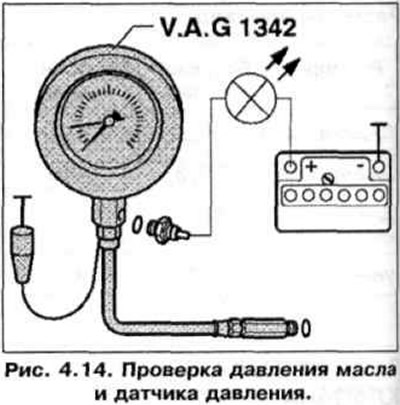
1. Unscrew the pressure sensor and screw it into the tester (Fig. 4.14).

1. Unscrew the pressure sensor and screw it into the tester (Fig. 4.14).


2. Screw the tester adapter into the hole for the pressure sensor in the cylinder head.

3. Connect the brown tester lead to "-".

4. Connect the VAG 1527 LED bulb with an additional wire to the "+" of the battery and the pressure sensor.

5. If the tester light comes on, replace the oil pressure sensor.

6. If the tester lamp does not light, start the engine and slowly increase the engine speed. At a pressure of 0.3-0.7 bar, the lamp should light, otherwise replace the sensor. At 2000 rpm and a temperature of 80°C, the pressure should be 2.0 bar. At high crankshaft speeds, the oil pressure should not exceed the limit of 7 bar.

This article is available at russian, bulgarian, belarusian, ukrainian, serbian, croatian, romanian, polish, slovak, hungarian
The text has been checked: Kolesnikov Artem

Share information:

Previous articles
Lubrication system
Checking the valve guide bushing
Valve seat machining
Gas distribution mechanism
Compression check
Removal and installation the camshaft housing
Next articles
Cooling system
Checking the fuel pump
Electronic Engine Control (EPC)
Checking the accelerator pedal position sensor
Gasoline vapor recovery system
Exhaust gas system


Similar articles from other manuals for VW cars:
Checking oil pressure and oil pressure sensor Passat B5 (1996-2005)
Checking oil pressure and oil pressure sensor Golf 4 (1997-2004)
Checking the oil pressure sensor (petrol engine) Touareg 1 (2002-2006)
Oil filter, oil cooler and oil pressure sensor Tiguan 1 (2007-2015)
Checking tire pressure Sharan 1 (1995-2000)
Checking the air pressure in the tires Transporter T4 (1990-2003)
Removal, installation and checking the oil pressure sensor Beetle (1960-1986)
Link to this page in different formats


Visitor comments


No comments yet


How much will 43 + 15 =


Polo 4 
  • General information
  • User manual
  • Maintenance
  • Power unit
  • Engine repair
  • Cooling and lubrication system
  • Control system
  • Injection system (diesel)
  • Supply system
  • Exhaust system
  • Chassis
  • Front suspension
  • Rear suspension
  • Steering
  • Wheels and tires
  • Brake system
  • Body
  • Interior
  • Exterior
  • Electrical equipment
  • Equipment and devices
  • Wiper system
  • Lighting system
  • Electrical circuits
Polo 3 
  • General information
  • User manual
  • Maintenance
  • Power unit
  • Petrol engines 1.4 and 1.6
  • Petrol engines 1.4 (V16)
  • Petrol engines 1.6 and 1.8
  • Diesel engines 1.7 and 1.9
  • Diesel engines 1.9 D and TD
  • Transmission
  • Mechanical gearbox 085
  • Mechanical gearbox 020/02K
  • Chassis
  • Front suspension
  • Rear suspension
  • Steering
  • Brake system
  • Body
  • Exterior
  • Interior
  • Electrical equipment
  • Equipment and instruments (until 2000)
  • Equipment and instruments (after 2000)
  • Electrical circuits
  • Wiring diagrams (petrol)
  • Wiring diagrams (diesel)
VWmanual.ru © 2016-2026 | Mobile version | News and articles | Sitemap: EN BG BY UA RS HR RO PL SK HU | Write message | Site search
Passat B2 • Passat B3 • Passat B4 • Passat B5 • Passat B6 • Golf 1, diesel • Golf 1, petrol • Golf 2, petrol • Golf 2 • Golf 3 • Golf 4 • Golf 5 • Polo 3 • Polo 4 • Touareg 1 • Tiguan 1 • Sharan 1 • Transporter T3 • Transporter T4 • LT 28 • LT 2D • Beetle • Caddy 3 •
Our website uses cookies to ensure functionality and convenience.