



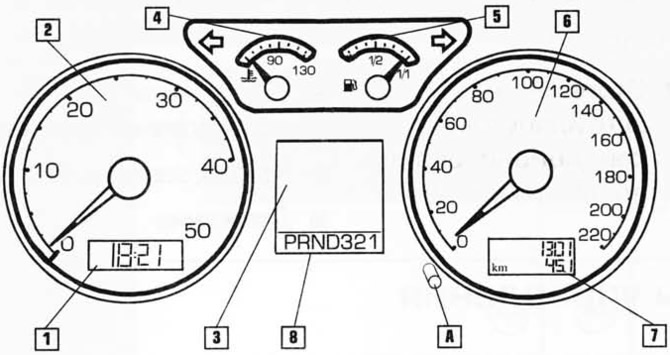
- 1. Clock
- 2. Tachometer
- 3. Multifunctional indicator
- 4. Coolant temperature
- 5. Fuel level indicator
- 6. Speedometer
- 7. Service interval display
- 8. Selector position indicator (operating mode selection lever)
- A. Control button
The arrangement of the instruments on the panel depends on the model and the engine installed in the vehicle.
1. Clock
To set the correct time there is a button to the right below the tachometer.
- To set the hours, turn button (A) to the left.
- To set the minutes, turn button (A) to the right.
2. Tachometer
The tachometer shows the engine speed in hundreds of revolutions per minute. It is convenient for the driver to select the moment of gear shifting. Too high engine speeds lead to its intensive wear and deterioration of fuel efficiency.
NOTE: Do not rev the engine so much that the tachometer needle enters the red zone. High engine speeds may cause engine malfunction or even failure.
If the engine speed drops to 1200 rpm, shift to a lower gear.
Avoid high engine speeds during the break-in period.
3. Multifunctional indicator on the instrument panel
View the original on the website [VWmanual.ru]
By selecting "Main Menu", you can get a lot of useful information on the indicator. You can also turn off the indicator.
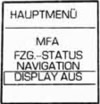
The main menu can be called up if there are no warnings on the indicator.
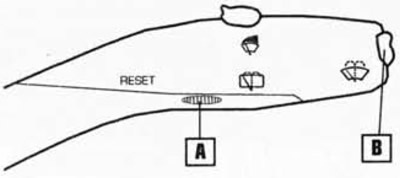
- Press button B on the windshield wiper control lever for more than two seconds.
- Use the same button to select the desired menu item. The selected item will be highlighted.
- To confirm the selected item, press button A (RESET) on the windscreen wiper control lever or wait approximately two seconds, then the selected menu item will be confirmed automatically.
The menu items have the following meanings.
MFA (Multifunctional indicator)
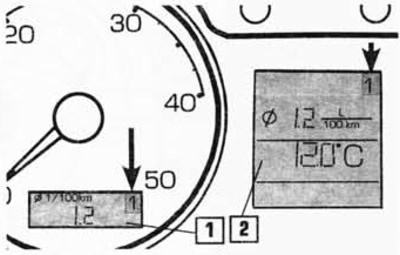
The indicator can be located in the place of the clock at the bottom of the tachometer (1) or between the tachometer and speedometer (2). To switch displays, briefly press button B on the windscreen wiper control lever with the ignition on.
The indicator allows you to obtain the following information:
- Outside air temperature
- Current fuel consumption
- Average fuel consumption
- Distance that can be traveled on the remaining fuel
- Distance traveled
- Average speed
- Travel time
The indicator has two memory levels, marked with numbers 1 and 2. The memory levels are shown in the upper right corner of the display (shown in the figure by arrows).
- 1 - single trip memory
- 2 - long-term memory
To change the memory, briefly press button A with the ignition on.
Single trip memory 1 stores data from ignition on to ignition off: travel time, distance traveled and fuel consumed. Based on this data, the average speed, average fuel consumption and distance that can be traveled on the remaining fuel are calculated.
If movement has been stopped for more than two hours, the information from the memory is automatically erased.
Long-term memory 2 stores data on several single trips with a total duration of up to 99 hours and 59 minutes, a distance of up to 9999 km and fuel consumption of up to 999 liters. The average speed and fuel consumption for all trips are calculated from this data. If one of the above figures is exceeded, the data stored in the memory is erased and the accumulation of information starts from the beginning. Unlike the memory of a single trip, the long-term memory is not erased if the trip is interrupted for more than two hours.
Both memories can be erased by pressing button A for more than two seconds. The same effect is achieved by disconnecting the battery.
Outside air temperature
The sensor measures the temperature in the range from -40 to +500°C. If the outside temperature is between +4 and -7°C, a snowflake symbol appears on the indicator (warning of possible icy roads). This symbol will flash for approximately 5 seconds and remain on until the outside temperature rises above +4°C or falls below -7°C.
Attention! Keep in mind that there may be ice on the road even at temperatures above +4°C.
Travel time
Memory 1 stores the time of the last trip (from ignition on to ignition off).
Memory 2 stores the total travel time of all trips displayed on the display, as long as it does not exceed 99 hours and 59 minutes. If this limit is exceeded, the calculation starts again from zero.
Distance traveled
The comments regarding "travel time" also apply to the distance traveled. The maximum distance the system can remember is 9999 km or 6214 miles.
Current fuel consumption
The display shows fuel consumption in liters/100 km. The calculation is performed at intervals of 30 m. If the car is stationary, the consumption is calculated in liters/hour. The information on the display is updated every two seconds.
With this information you can adjust your driving style.
Average fuel consumption
After the ignition is turned on, the average fuel consumption appears on the display after 300 m. When the car is moving, the fuel consumption information is updated every 5 seconds.
Memory 1 contains the average fuel consumption for the last trip.
Memory 2 stores the average fuel consumption for all individual trips. Note: The total fuel consumption is not displayed on the display.
Distance that can be traveled on the remaining fuel
This distance is calculated based on the fuel level in the tank and the total fuel consumption. The information is updated every 10 km.
Average speed
The comments regarding "average fuel consumption" also apply to average speed.
Error messages
When the ignition is turned on, the condition and operability of the vehicle systems are automatically checked. If faults are detected, a message about the most serious of them appears on the display. The message should be checked as soon as possible and the fault eliminated. If more than one fault is detected, the messages about them will change on the display every two seconds. After 10 seconds or after pressing the B button, the messages stop and are saved in memory under the general heading "Vehicle status" (car condition). If the main menu item "Vehicle status" blinking, it means there is at least one fault message in the memory.
If the memory contains more than one fault, the following message appears on the display, for example: "STATUS 1/2". This message means that there are two faults in the memory, the first of which is shown on the display. To read individual messages, press the button on the lever.
4. Coolant temperature
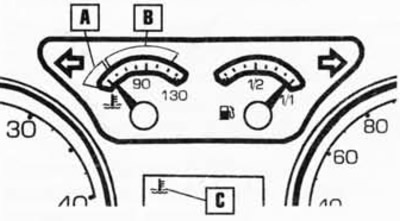
The indicator starts working when the ignition is turned on.
After the ignition is turned on, the system checks the sensor and the device circuit for proper operation. At this time, the C indicator starts to flash, which means the check is in progress, then, after a few seconds, the indicator goes out. If the arrow is in zone A, then the engine has not yet warmed up. At this time, avoid driving at high speeds and do not load the engine.
It is recommended to start driving when the instrument needle is in sector B. If the engine is running normally, the needle should be in the middle of sector B. If the engine is heavily loaded or the outside air temperature is high, the needle may shift to the right. This does not yet mean an emergency situation if the C indicator does not light up.
If the indicator comes on while driving, first check the coolant temperature on the display.
If the arrow does not leave zone B, add fluid to the cooling system as soon as possible.
If the arrow has moved to the right beyond zone B, the engine has overheated. Turn off the ignition and try to determine the cause of the overheating.
Warning! Do not open the hood if steam is coming out from underneath it. There is a risk of scalding! Wait until the steam stops coming out.
Caution! Do not touch the cooling system fan. The fan may suddenly turn on even if the ignition is off.
5. Fuel level indicator
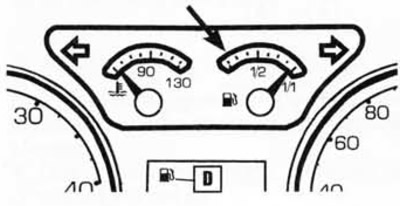
When the ignition is on, the indicator shows the approximate amount of fuel remaining in the tank. The tank has a capacity of about 45 liters of fuel. If the arrow enters the zone indicated by the arrow and the D indicator lights up, then there are approximately 7 liters of fuel left in the tank. At the same time, the system gives an audible signal.
6. Speedometer
Shows the vehicle speed in km/h. On some models, an audible signal is given if the speed exceeds 120 km/h.
7. Odometer
At the bottom of the speedometer, the indicator shows two numbers.
The top number shows the total mileage of the vehicle since it left the factory.
The bottom number is the trip mileage, it starts counting the distance after resetting. To reset the single trip counter, press the button under the speedometer.
Visitor comments