




2. Press "08" to select the "Read measured value block" function and confirm by pressing the "Q" button. The display should show the following information:

3. Select the desired group. Press "001" three times to select "Display Group 1" and confirm with the "Q" button. The display should show the following information:

4. Changing display groups is performed in the following sequence:
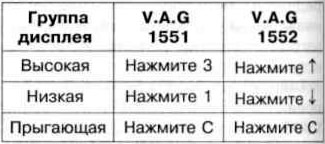
5. If all required values are reached on the display, press "→". The following information should appear on the display:

6. Press "06" to select the "Complete Output" function and confirm by pressing the "Q" button.
Visitor comments